



Add and edit Recipes
At the bottom of your Custom Item page, you can add and edit recipes.
Crafting Recipe
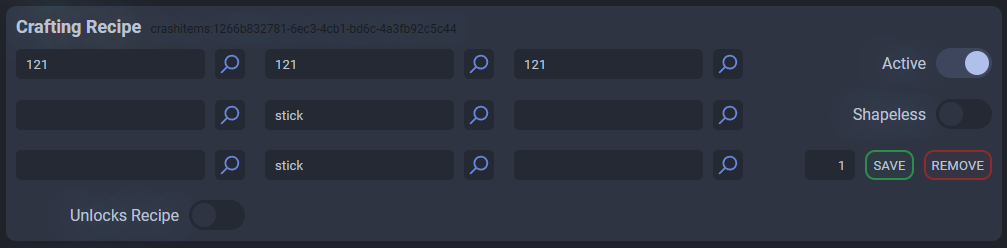
Click ADD CRAFTING RECIPE to create one and edit the 3x3 grid to define the recipe. Remember to activate it and, above all, save it by clicking the SAVE button.
Keeping Unlocks Recipe disabled will not unlock recipes for new players, but you can do so via script or command.
The number next to SAVE indicates how many output items are produced.
Cooking Recipe
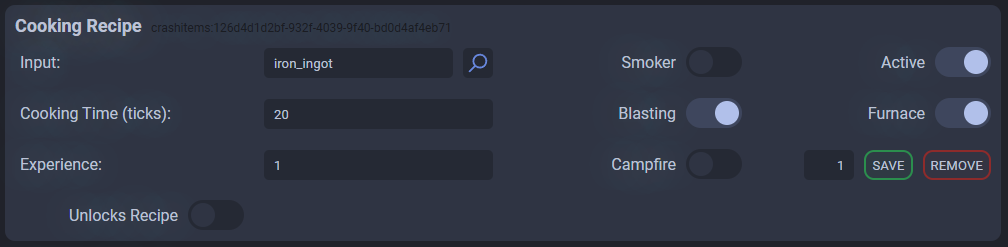
Click ADD COOKING RECIPE to create one. Here, the fields are fairly intuitive, and the rules for Crafting Recipes apply.
Stonecutter Recipe

Click ADD STONECUTTER RECIPE to create one and specify which material gives the item as a result. (To do the opposite, read the paragraph on Vanilla Items).
Vanilla Items
You can modify vanilla recipes or add new ones by creating a Vanilla Item (at the bottom of the Custom Item list) and modifying it as if it were a Custom Item.
For example, you could also add alternative recipes for a Vanilla Item and use your Custom Items as ingredients.